Tuesday, 31 March 2015

List of Android Secret Codes That You Should Know

As we all know that the Android is one of the most famous and most used operating system in smartphones. The Android has its own charm, which you can’t find in any other mobile operating system. Well, the popularity of Android devices depends upon the thousands of apps in the Play Store and you can find almost any type of apps and games for your Android device.
android secret codes
You might think that you know everything about your Android device but I am pretty sure that you don’t know some of these hidden secret codes that you can use to further explore your Android device. So, today I have created this article in which I will show you the list of Android secret codes that you should know to further explore your Android device. These secret codes will allows you to know more about your Android device and can also give you quick access to some of the features of your Android phone. So, without wasting much of your time, let’s get started with our list of Android secret codes.
Must Check: How To Access Computer With Android Mobile or iPhone

List of Android Secret Codes

  • Packet Loop Back Test => *#*#0283#*#*
  • Reset Factory Data => *#*#7780#*#*
  • Testing Touch Screen => *#*#2664#*#*
  • GPS Test => *#*#1472365#*#*
  • Audio Test => *#*#0289#*#*
  • Wireless Test => *#*#232339#*#*
  • Format your smartphone re-installs the firmaware => *2767*3855#
  • Info about your smartphone => *#*#4636#*#*
  • Enable Test Mode => *#*#19732840#*#*
  • Info about Touch Screen => *#*#2663#*#*
  • Field Test => *#*#7262626#*#*
  • Show Bluetooth device address => *#*#232337#*#*
  • Camera Update => *#*#34971539#*#*
  • Shows build time => *#*#44336#*#*
  • Displays Wi-Fi Mac Address => *#*#232338#*#*
  • Shows IMEI Number of your smartphone => *#06#
  • Test Proximity Sensor => *#*#0588#*#*
  • Google Talk Service Monitoring => *#*#8255#*#*
  • Test Vibration and Backlight => *#*#0842#*#*
  • ROM version => *#*#3264#*#*
  • Test LCD => *#*#0*#*#*
  • Test Bluetooth => *#*#232331#*#*
  • FTA Software and Hardware version => *#*#2222#*#*
  • PDA Phone, RF Call Date, Hardware => *#*#4986*2650468#*#*
  • Backup Media Files => #*#273283*255*663282*#*#*
Read Also: Best Android Apps To Watch Movies Online And TV Shows

Conclusion

So, this was all about the list of Android secret codes that you should know. I hope that now by using these codes you can know more about your Android device. If you have any type of queries regarding this article then do let us know, we will try our best to resolve them. And plus, if you’d like this article then do share this article with your friends and circles too.

How to Enable Whatsapp Voice Calling on Smartphones

The most awaited feature of Whatsapp has finally came and that is Whatsapp voice calling. There were users who were eager to avail this feature of Whatsapp and it has finally came. The latest voice calling feature has taken Whatsapp to another peak of success.
Whatsapp tips and tricks, voice callingThe Whatsapp voice calling is not different from Viber, Skype, Line or other services, but it has many more users than these. Therefore, there is a scope of using this feature by many users and many can interact with their circle using Whatsapp voice calling.
Additionally, there must be many users who are not very much acquaint with the process of enabling this on their Smartphones. Therefore, today we are going to make you learn that, “How to Enable Whatsapp Voice Calling on Smartphone?” You need to apply these simple steps and then you’ll be able to start making voice calls to your Whatsapp friends; however, remember that your friend must have enabled the voice calling too. You can only make calls using Whatsapp ones you have enabled the voice calling both sides.

Learn-How to Enable Whatsapp Voice Calling

So, here are the steps which are supposed to followed in order to enable Whatsapp voice calling on your Smartphones. The steps are quiet simple yet hidden and today these are going to be revealed for you guys here. Now, without taking your time more, I would request you to get towards the below piece of content in order to get this feature for your accounts too.
  • First of all, get the latest version of Whatsapp on your Phone. The latest version is Version 2.12.16, you can get it from Here.
  • Ones it is downloaded then install it on your Phone and then it’ll automatically add the voice calling feature to your account.
  • Now, you need to go to your Contacts and find a friend who has enabled this feature already, then you’ll see a Call button there. Simply tap on it and start making voice calls.
Whatsapp Tricks, How to, Tips
  • This was as simple as you’ve read it!
Read Here: Download Whatsapp for PC

Conclusion

This was our simple guide which could be used to enable Whatsapp voice calling on your Smartphones. We are sure that this would have been proven helpful for many of you out there. If you have any queries or questions to ask then do let me know. We shall get back to your queries and questions as soon as possible.
Furthermore, if you have found this guide helpful and worth reading then do share it with your other friends and circle too. You may never know that your shares may be proven helpful for many of the users out there. So, keep sharing and liking our content over social media in order to keep helping people in your circle.

Airtel TCP Unlimited {First on Internet}


Hi PC And Android users,
We are here to provide you new configs for airtel 3G/4G AirTel openvpn trick high speed free internet trick for you its based on Unlimited TCP host.
Its working all over India With Rocket Speed muct try it and comment below.


Requirement For this AirTel 3G Vpn Trick 
  1. AirTel 3G Enabled Sim card.
  2. Maintain main balance of Rs. 0 ,  Data Pack Required if you don't want to cap your 3g speed [More details on Attachment ].
  3. Apn: airtelgrps.com
  4. Speed Up to 1.5-2.3 mbps Tested on In 100 Mbps Modem.
How To use this AirTel 3G Vpn Trick 

For Mobile users:  Android mobile use can also use these AirTel 3G Trick configs  with their android devices just you need to follow these simple steps:-
  1. Download and extract config in SD card.
  2. Go to Google Play Store Search for open vpn for android. Or Click Here
  3. Install Open Vpn in you android device.
  4. Add Airtel 3G Vpn Config to open Vpn folder.
  5. Run and Enjoy  :)
For PC Users:

1.Download The Attachment of AirTel 3G Trick.
2.Install Nmdvpn and Put configs Here (C:\Program Files\NMDVPN\config)
3.Windows 7 and Windows 8 Users RUN NMD VPN as the Administrator.
4.Just Connect and Enjoy.
Configs here click on download picture..

Proof:-

Monday, 30 March 2015

Increase Your Google AdSense Earnings 2015

For a little over a month now, I’ve been looking at my AdSense earnings in Google Analytics to better understand my earnings, and I’ve stumbled across some rather interesting results. Without even realising it, I’ve come up with even more ways to increase my AdSense earnings each month. They range from simple ad placement, to writing specific posts, and appealing to a certain referrer. Here’s how you can increase YOUR earnings.
Table of Contents
  • Setting Up
  • Tip #1 – Appeal To Your Top Referrers
  • Tip #2 – Write Content That Links Within Your Site
  • Tip #3 – Text and Image Ads
  • Tip #4 – Increase Ad Size
  • Tip #5 – Ad Placement

Setting Up

The first thing you’ll want to do is set up your AdSense so that you can study it in more detail, in Analytics. To do this, when you’re viewing your report overview, just click the link to integrate Adsense with your Analytics account. It’s just one click and then a small amount of information on your Analytics account. You have to be an admin on your Analytics account, otherwise it won’t let you make the changes necessary, but if you’re the only person running the website, this shouldn’t be a problem. NOTE: Because you’re adding new information, GA will not transfer over details from the past, you will only see new results from when your join the two together.
Now that you’re set up, it’s best to have a run down of what all the terms mean, so that you can understand your results better.
AdSense Revenue is the amount of money you’ve made in your selected time period .
/ 1000 visits, is how much money you’ve made for every 1000 visits to your site.
Ads clicked, is the amount of ads clicked by viewers.
Ads clicked / visit, is the total number of visits, divided by the number of ads clicked.
CTR stands for Click Through Rate and this is the percentage of clicks you get for each ad impression.
eCPM stands for effective Cost Per 1000 impressions (M being a roman numeral). It’s the total earnings per 1000 impressions.
AdSense Ads Viewed is the total number of ads seen, from all multiple ads on all the pageviews.
AdSense Unit Impressions / Visit is the number of ads that are viewed by visitors, per visit.
AdSense Page Impressions is the amount of pages viewed that have AdSense ads on them.
AdSense Page Impressions / Visit is similar to pages viewed per visit, only it’s pages with ads viewed, per visit.

Tip #1 – Appeal To Your Top Referrers

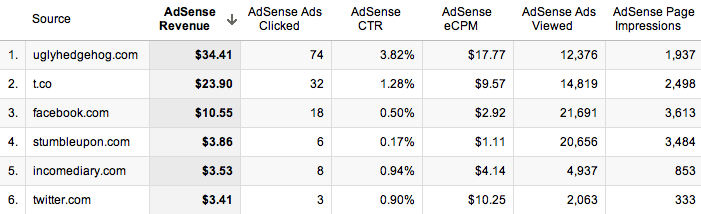
By far, my favourite thing about using Analytics to look at your AdSense, is that you can then find out which of your referrers are worth the most in terms of AdSense revenue.When you go into the new GA, click on Content, then AdSense, then AdSense Referrers, this will bring up a list of all the websites that sent visitors who have clicked on an ad, as well as a timeline of your earnings.  The most important part of the results isn’t the ads clicks, viewed, or even the revenue; it’s the Click Through Rate (CTR) and eCPM (effective Cost Per 1000 impressions).

The CTR is the percentage of ads that are clicked, per impression, so you want that to be as high as possible. The reason the CTR is much higher than some of the other referrers is because of the quality of visitor that I’m receiving from that referrer. StumbleUpon has a particularly poor CTR, because the people who use it aren’t looking for anything in particular so it’s hard to get their attention, which may result in them clicking on an ad.
The eCPM is also substantially higher than the other referrers, which tells me that if I can increase the number of impressions that I’m getting from them, then I will earn a lot more money. The quality of Twitter user is usually pretty poor, as they don’t typically spend too much time on the site (00:01:47), and even though a link a lot to my website  around 10 times a day through Twitter, I still get less traffic from them than Facebook. Facebook on the other hand has a better quality of visitor, with people looking at more pages and staying for longer (00:02:29, but their eCPM is actually lower than that of Twitter.
People are less likely to click on ads when they’ve come from websites such as Facebook, as they’re more interested in the content that you’ve written. They provide a good quality of visitor, but their time on site is almost half that of the forum in my niche, so it’s important to find a good balance of visitor quality. Twitter users seem to behave differently to other users, as they’re in a browsing mode, and are clicking on content that they see in their feed before it disappears. It would appear that they treat the websites they visit in a similar way, by clicking on more ads. I actually get more traffic from Facebook, but my earnings from Twitter far outweigh those of Facebook, which is good really, because it’s much more acceptable to post multiple links on Twitter.

Tip #2 – Write Content That Links Within Your Site

This step produced shockingly good results for my earnings. This meant that anyone who had viewed the page would have to click on another if they wanted to learn anything. This forced them to increase their pages per visit, which produces more ad impressions.
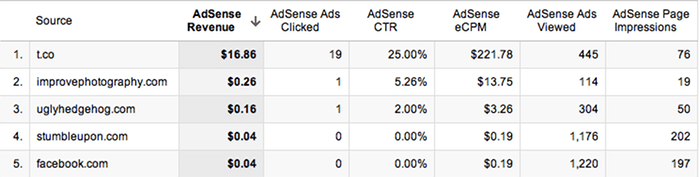
When I break down my earnings so that I’m only receiving information from the 6th of November, I can start to see which referrer is earning me the most money. T.co is the URL shortener that Twitter uses, so I can see clearly that a small number of page impressions has yielded very strong earnings. With a large number of clicks from 76 page impressions, I have an unusually high CTR. From this response, I can see that to earn money, this is the sort of content that I need to be promoting, though as many sources as I can. I’m currently combining this content, with the forum mentioned in the tip above, so that I can drive top quality traffic, to the content that earns me the most money. After just 2 days of doing this, I’m already starting to notice a massive improvement.

Tip #3 – Text and Image Ads

Enabling your ad units to display both text and image/rich media ad types, increases the number of ads competing to appear on your site. More advertisers in the ad auction drives higher bids and more revenue for you. On average, publishers see a 59% increase in eCPM earnings when they make these recommended changes. If you’re not already using both, then it’s as simple as going into the ‘My ads’ tab, and clicking on ‘Edit ad type’, next to the ad in the list. This will increase the cost per click, so even if you’re not improving the number of clicks that your website is getting, you’ll still make more money.

Tip #4 – Increase Ad Size

Advertisers prefer wider ad units for their premium inventory, resulting in higher bids for your ad placements. Though all sites are different, publishers typically see 0.35 eCPMs when using the wider ad size. You can start by simply changing single ads on popular pages to see how well they work, and if it’s not too intrusive, then you can start rolling it out across your whole website. I didn’t do this in my sidebar because I was aware that the whole width of the sidebar would have to change, and that would not only take a lot of time, but mess up the spacing that I had laid out for posts. Instead, I added a wider ad at the end of each post, that differs to all the other ads on my website, and this saw a good improvement in ad sales.

Tip #5 – Ad Placement

Where you choose to place the ad on your site will make a big difference to the amount of clicks that you get, because the more obvious the ad, the more likely someone will be to see it. It’s hard to judge on your own website because we look at our sites differently to how other people view them, so the best way to start seeing results, is to experiment with ad placement. When I first started, I had two ads on my website, one at the top of the sidebar, and one at the bottom. Since then, we’ve added another ad to the side bar, and reloated the bottom one to under the subscribe button, added an ad to the bottom of each post, and put a small text ad just below our header.
The small text ad below our header made the biggest difference to our results because it stands out the most to new visitors, and could even be possibly mistaken for a link within our own website. It’s a very simple ad, and less appealing than a flash one, but it’s much less intrusive, and in a better position. Overall, I don’t like to add too many ads because I don’t want to put off visitors or make my website look bad. I always find it odd when people choose to include an ad block in their header, because that makes me find their website much less appealing.

Facebook Chat code

Facebook Chat code

Wanna try this?


[[107015582669715]] = A
[[116067591741123]] = B
[[115602405121532]] = C
[[112542438763744]] = D
[[115430438474268]] = E
[[109225112442557]] = F
[[111532845537326]] = G
[[111356865552629]] = H
[[109294689102123]] = I
[[126362660720793]] = J
[[116651741681944]] = K
[[115807951764667]] = L
[[106596672714242]] = M
[[108634132504932]] = N
[[116564658357124]] = O
[[111669128857397]] = P
[[107061805996548]] = Q
[[106699962703083]] = R
[[115927268419031]] = S
[[112669162092780]] = T
[[108983579135532]] = U
[[107023745999320]] = V
[[106678406038354]] = W
[[116740548336581]] = X
[[112416755444217]] = Y
[[165724910215]] = Z
And the most important part… How to use it?
Just copy the code of the alphabets you need and insertExample : Here is the code for HELLO
[[111356865552629]].[[115430438474268]].[[115807951764667]] [[115807951764667]] [[116564658357124]]

 them in chat with a space between each codes. Now there you go with cool coloured text in chat!

Sunday, 29 March 2015

Snapdeal Loot: ₹50 Snapdeal Cash + ₹25 Per Refer [Unlimited Trick]

As you already know, Snapdeal is one of the biggest online shopping network across India. As compared to Flipkart, snapdeal always offer products at lower prices. To target mobile app users and maximize profit, snapdeal is now looking for “refer and earn” program. Using this referral program, you can earn unlimited sd cash! Let us take a closer look at this awesome deal.


Steps To Get Free Rs. 50  Snapdeal Cash:-

Enter this promo code
zP6X874810

snapdeal refer and earn
1) Just uninstall your existing Snapdeal android app, else you will not be eligible for this offer.
2) Important step: Now click this link to download latest version of snapdeal from android play store. Enter referral code zP6X874810 to get instant 50 Rs in wallet.
 3) Open the app and navigate to “AppShare” section located at left sidebar.

snapdeal invite and earn rupees
4) Start sharing your unique url on Whatsapp, facebook, gmail and ask friends to download app.
5) You will earn 25 Rs in SD cash while invited friend will get 50 Rupees in wallet.
6) You can use this sd cash for your purchases on entire snapdeal website.

Now change your android id and do again with another number loot lo.

Thank You Keep Visit For More Tricks And Tips.

How To Reset Pattern Code Without Losing Data !


// // Leave a Comment

How To Reset Pattern Code Without Losing Data

HOW TO RESET PATTERN CODE  WITHOUT LOSING DATA

Pattern_cyberstream.in

Have Forgotten Your Pattern Lock Code? Follow the steps to Get back your access to your Phone.
HOW TO RESET PATTERN CODE WITHOUT LOSING DATA .
NOTE:- Your device must be rooted.
Download Aroma File Manager.zip from Here.

1. Copy Aroma File manager.zip to your memory card.

2. Open your recovery (press volume Up + Home+ Power button or it can be different in some other Device : ( if it doesn’t work, Use Google to get your device info).

3. There’ll be an option in recovery called “mount” . Go to that option and then mount all cache ,system,efs, etc..,

4. Then select “update” and select “apply update from SD/external” and select aroma file manger.zip(the file you downloaded).

5. After Flashing or updating, the Aroma File Manger will open. Use volume keys for up/down and power button to select.

6. In Aroma File manager , Go to menu by pressing left key, which is located in bottom strip and then select Settings.

7. Go to bottom and select “automount all devices on start ” then exit from Aroma File Manger.

8. Now after exit , re-update that Aroma File Manager again and it will open again.

9. Go to data >> System.

Then find ‘gesture.key’ (for pattern lock) and ‘password.key’ (for password lock) then long touch on gesture key or password key and some option will be prompted , choose delete to delete that file and restart.

After that draw any random pattern to open the lock.

Done and enjoy :
Note : Use Exit option in AromaFile manager don’t direct reboot in Recovery.